
Old Components
An eleven-year-old PC is still doing the job. So why does Windows think it has become too old? A small investigation into technology, money, obsolescence and the strange moment when “old” becomes “not good enough.”

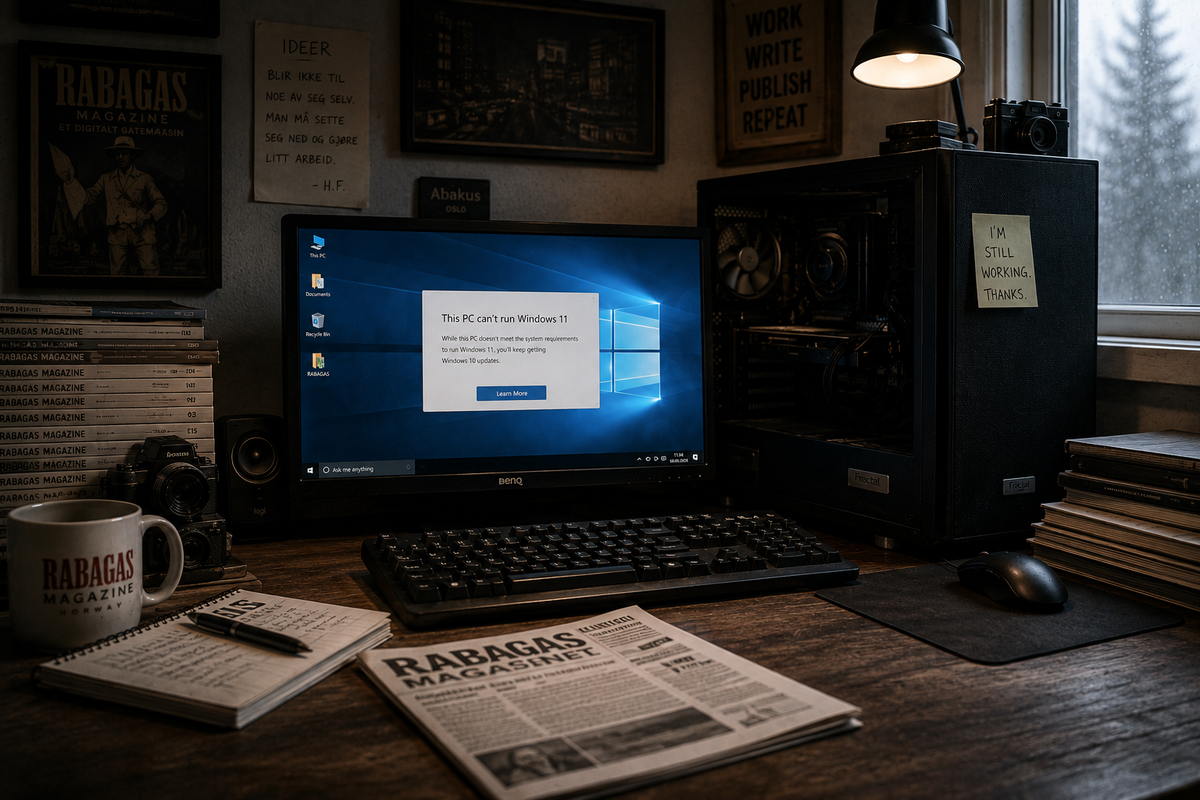
The Beast on the Desk
It began with a message from Windows.
Not an error message in the old-fashioned sense of the word, the kind that makes a program freeze, the screen turn blue, or the computer suddenly decide that it no longer recognizes the keyboard. This was a much more polite message. Almost friendly.
My machine was not good enough.
That is a rather peculiar message to receive from a computer that sits there working for you.
I have had this PC for a long time. In fact, for so long that I no longer think of it as an investment, in the same way that you eventually stop thinking of a good winter jacket as something you once bought. It has simply been there. On the desk. Through moves, projects, financial downturns, good ideas, bad ideas, long working days, and those periods when I have been convinced that this particular project will finally be the one that puts the rest of my life in order.
It has been there for RABAGAS.
That is perhaps the most precise way of describing what kind of computer this is.
It has not been a gaming machine. I have never had much need to sit around shooting people in a digital landscape while my computer works itself into a frenzy trying to keep up with the graphics card. It has been a work tool. I write on it. I read on it. I edit. I research things. I make things. I have had my browser open with so many tabs that even I have lost track of what half of them were supposed to be used for. I have written code on it, played audio, processed images, and produced a frankly unreasonable amount of text.
And it has done the job.
That was why the message from Windows felt a little strange.
Because when someone tells you that a work tool you have been using for eleven years is no longer good enough, you might reasonably expect there to be something wrong with it.
There wasn't.
So we did the only sensible thing.
We examined it.
Nothing particularly dramatic, either. No white coats. No stethoscope. No man from the Norwegian Data Protection Authority standing there with a serious expression and a clipboard. Just a terminal, a few commands, and a growing feeling that this was either going to be very boring or quite interesting.
We started with the temperature.
Computers do not like getting hot. They have fans that go round and round to keep the most important parts of the machine at a temperature where they can still think. The processor is, in many ways, the brain of the system, although the comparison starts to fall apart rather quickly if you take it too seriously.
Mine was at 25 degrees.
That is not the temperature of a machine fighting for its life.
The graphics card, the part that among other things makes sure that images and movement actually get from the computer to the screen, was at 39 degrees.
The motherboard was at 34.
It was almost offensively healthy.
We examined the storage as well. The small, fast drive where Windows lives reported that it was healthy. The large old hard drive next to it, a sort of digital storage cupboard where I have accumulated enormous amounts of data over the years, reported that it was healthy too.
Windows said both were Healthy.
It was becoming difficult to argue that the machine was sick.
Then came the memory.
RAM, as it is called. It is basically just a workspace the machine uses while it is doing things. Think of it as the desk of a person who is working: the things you need right now are spread out in front of you, while the rest are in filing cabinets around you. The more space you have on your desk, the more things you can keep within reach without having to put something away first.
Mine has 16 gigabytes.
That was once a fairly respectable amount.
It is still enough for me to work without having to sit around waiting for the machine to retrieve every single document from the archive every time I need it.
And then there was the processor.
Intel Core i5-6600K.
The name probably means more to someone who has spent an unnecessary amount of time reading about computers than it does to the rest of the world. To me, it has mostly been the little factory inside the machine that has been told to do things, and has done them.
It is eleven years old.
This is roughly where you begin to understand the problem.
Not because it is eleven years old.
But because Windows knows that it is.
The computer itself has very little interest in the calendar. It wakes up in the morning and does what it did yesterday. It calculates. It stores. It retrieves documents. It displays websites. It plays audio. It receives instructions and passes them on to the appropriate parts of itself.
It does not know that Microsoft has made a new version of Windows.
It does not know that 2026 has arrived.
It only knows that I ask it to do something.
And it does it.
That is perhaps what irritates me most.
Not that Microsoft has made a new operating system. They are perfectly entitled to do so. The world moves on. Software develops, security problems are discovered, new features arrive, old features disappear, and somewhere there are people sitting in meetings discussing what the future of computing is going to look like.
What I object to is the small difference between saying that something is old, and saying that it is not good enough.
Because my machine is old.
I have no problem admitting that.
It was a beast when I bought it.
Today it is primarily a beast that has been sitting on the desk for long enough that you have stopped noticing its size.
And perhaps that is really the problem with old things.
We begin to believe they are obsolete simply because they have been there for a long time.
Even when they still work.
When We Actually Checked Whether It Was Sick
There is something slightly comical about beginning a medical examination of a computer you have already decided should not be retired.
For one thing, it is difficult to explain what you are actually examining. A computer does not have a pulse, although it can use more electricity than a small refrigerator when you ask it to do something demanding. It does not have blood pressure. It does not cough. It can, admittedly, make noises that lead you to believe it has suffered an acute asthma attack, but that is usually just a fan deciding to demonstrate its personality.
Still, I wanted to know whether Microsoft might have a point.
Perhaps the machine really was on its way out.
Perhaps it had simply become very good at hiding it.
So we began examining it a little more systematically.
The first thing that struck me was that it behaved like a machine that intended to live for a while longer. The drives, meaning the places where the computer stores information when it is not actively working with it, reported good health. One is a small, fast SSD where Windows lives. The other is a much larger and older hard drive that functions rather like a basement: things I do not need every second are stored there, but things I absolutely do not want to lose.
Both said the same thing.
Healthy.
That is quite a satisfying word to receive from a computer.
Then we examined Windows itself.
This was where we finally found something.
Windows had corrupted system files.
That sounds far more dramatic than it turned out to be. System files are essentially parts of the machinery inside the operating system itself, small building blocks that Windows needs in order to know how to do its job. If some of them become damaged, certain things can begin behaving strangely. It is a little like discovering that several pages are missing from the manual of an appliance that has nevertheless managed to keep working because it remembers the rest by heart.
We asked Windows to repair them.
It did.
Then we ran another check, this time of the very storage area Windows uses to retrieve the necessary system components. It sounds about as exciting as it is, but it took some time, and at one point the progress meter reached one hundred percent and told us that the repair had been completed.
So we ran the first test again.
This time Windows found nothing.
No corrupted files.
No integrity violations.
Nothing indicating that the system was damaged.
The computer had, therefore, suffered a minor illness.
We had found it.
We had treated it.
And now it was healthy.
It was at this point that the examination began to feel slightly insulting.
Because we now had an eleven-year-old computer that had passed its health check, had healthy storage devices, temperatures that were nowhere near concerning, enough working memory to do what I ask of it, and an operating system that, following a small repair, could document that it no longer had any damaged system files.
But Windows 11 still did not want it.
It was rather like showing up at a hospital, being told that all your test results are fine, and then being turned away at reception because you were born in the wrong year.
That was when we discovered something else as well.
I had thought I had restarted the machine a few days earlier.
Windows said I had not.
Not properly.
This eventually became a small digression that deserves more space than it really ought to, because computers have a peculiar talent for making even the simplest things unnecessarily complicated.
Windows had registered that the machine had last properly started in July. I knew it had been shut down since then. It turned out that Windows has a feature called Fast Startup, which essentially makes shutting down slightly less final than the word “shut down” would suggest. When I turn the computer off, not everything inside Windows necessarily has to die completely. Some of it is packed away and set aside so that the next startup can happen more quickly.
It is a clever solution.
It is also a solution that allows the computer to tell you that it has been alive for more than a month when you personally watched it go dark several days earlier.
So we had to restart it properly.
Not “turn it off and turn it on again.”
Not the modern variation where the computer performs a sort of polite half-shutdown and then retrieves itself again.
An actual restart.
When we asked Windows to do it, it did.
Afterwards, we asked when the machine had last started.
August 18th.
There it was.
No mystery. No defective motherboard. No hidden illness.
Just Windows being a little creative with the meaning of the word “off.”
It was actually a rather good image of the entire situation.
Because every time we examined the machine, we found something that could have been a problem. But when we looked more closely, it turned out to be either something that could be repaired, something that could be explained, or something that was not really a problem at all.
The only thing we could not repair was its age.
That was still sitting there.
Eleven years.
And that was precisely the thing Windows did not want to discuss.
When a Machine Gets Too Old
Perhaps this is where the story of the old PC becomes a little more complicated.
Because it is easy to turn this into a story about technology. About processors and operating systems and security requirements and all the other things that live inside a computer and which most of us can quite happily leave to other people to understand.
But that is not really what annoys me.
I understand perfectly well that Windows has to evolve. I understand that new versions need new features, that security cannot be frozen in the year a machine was purchased, and that manufacturers eventually have to draw a line around which old components they are willing to spend time and resources supporting.
That is not unreasonable.
It is just slightly strange to sit with a machine that works and be told that it is not good enough.
Because “old” and “useless” are two different words.
It is perhaps a distinction we have become a little bad at seeing.
A car can be twenty years old and still take you to the shops. A chair can be thirty years old and still be a good chair. A jacket can have lost the shine of novelty and still keep the rain out.
Age is not necessarily what determines whether something is finished.
What matters is what it can still do.
My PC can still do what I need it to do.
That is really quite a simple requirement.
I do not need it to be impressive. I do not need it to be modern. I do not need it to have lights inside the case or be able to run the latest computer game with the graphics turned up to a level where every blade of grass appears to have its own PhD in botany.
I need it to work when I sit down to work.
That is what it has done for eleven years.
And this is where the money comes in.
Because it is easy to say that you can simply buy a new PC.
It is about as easy as saying that you can simply buy a new car when the old one has picked up a few scratches.
For some people, perhaps that really is how simple it is.
For others, a computer is an investment you make because you need a work tool, and then you use it until it no longer does the job. You buy it with the expectation that it will last. You take on the expense when you can afford it, and hope that it will not become a new problem before the old investment has had time to pay for itself.
RABAGAS Magazine has not, so far, turned me into a man who can spontaneously buy a new computer because Microsoft has updated its minimum requirements.
I have to save.
It is not tragic.
It is simply reality.
And that is why it also becomes a little strange when the technology world talks about computers as though they have a natural expiration date.
Eleven years is a long time.
I know that.
An eleven-year-old computer is old by almost any technical measure.
But it has also had eleven years to prove what it is worth.
It has been a desk, an archive, a darkroom, a small printing press, a typewriter, a library, a music studio and a window onto the rest of the world. It has helped create things that should never have been created, things that perhaps should have been created sooner, and things I still do not entirely know whether were finished when I published them.
It has been there.
It is difficult to calculate the value of that in gigabytes.
And perhaps that is why I find the whole situation slightly amusing.
Because we actually did the opposite of what people normally do when technology starts getting old.
We did not throw it away.
We did not open an online shop and start comparing prices.
We examined it.
And the result was not that the machine needed to be retired.
The result was that it was healthy.
It had some corrupted Windows files. They were repaired.
It had some strange behaviour around shutting down and starting up. That was explained.
The drives were healthy.
The temperatures were fine.
The system works.
So there I am, sitting with an eleven-year-old beast on my desk, a machine that still does its job, but which happens to be on the wrong side of a line someone else has drawn.
That is perhaps the real frustration.
Not that technology moves forward.
But that it moves forward in a way that sometimes makes what already works look like a problem.
I am not going to pretend that an eleven-year-old PC is better than a modern machine. That would be foolish. New computers are faster, more secure and built for a reality that has changed since I bought this one.
One day it will be replaced.
Both it and I know that.
But that day should come because it can no longer do the job, not because someone in an office far away has decided that its year of birth makes it unworthy.
For now, it is still there.
The fan is running.
The screen is lit.
Windows starts.
I open a document.
I begin to write.
And the PC does what it has done for eleven years.
It works.
That is good enough for me.
For now.